Remote Exams
ABR exams are delivered remotely for your safety and convenience. Learn about technical requirements, IT setup for institutions, webcam guidelines, and more.
-
All ABR exams are delivered remotely. This helps ensure a safer, healthier, and more convenient experience for you — our candidates and diplomates.
Basic computer requirements for both computer-based and oral exams are provided in the IT Requirements for Institutions section below and in each exam guide. If you are taking a computer-based exam, you will also need to use a side-view webcam.
If you would like to wear earplugs on exam day, the links below are provided solely as examples to illustrate the style of earplugs recommended for your exam. The ABR does not endorse or require any specific brand. You may choose any earplugs of a similar style from the vendor of your choice.
- Huffbio Soft Foam Ear Plugs with high noise reduction
- Flents Protechs Reusable Sport Ear Plugs
- Flents Quiet Quick® Foam Ear Plugs
Side-View Webcam Guidelines for Computer-based Exams
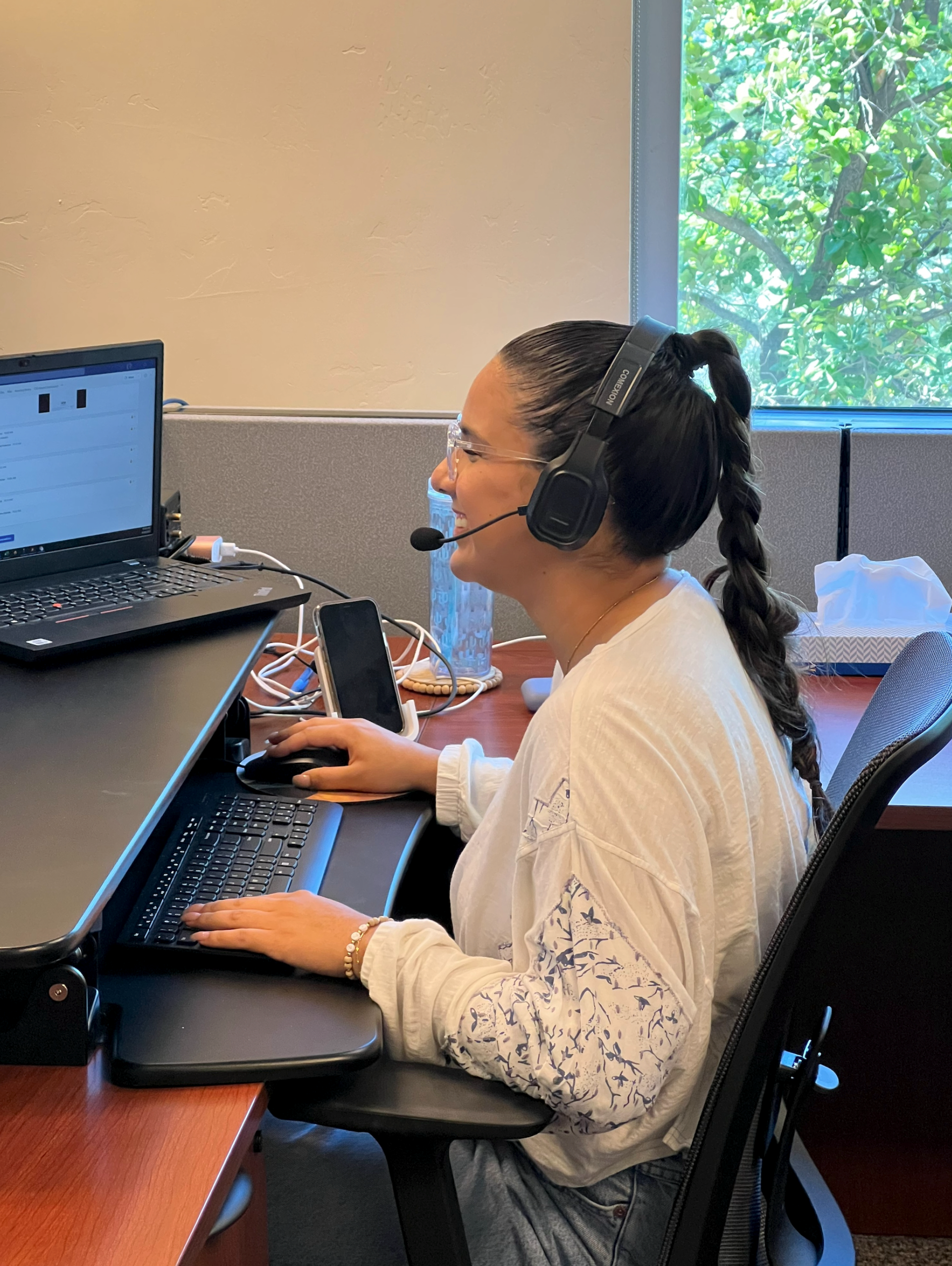
To maintain a secure exam environment, you’ll need to use a side-view webcam that shows your full workspace during the exam.
Your camera must show:
- You, your hands, and your mouse. To help with monitoring, please keep your hands visible.
- The entire surface of your workspace, including all devices and the exam screen. Your mobile device must be on the same side as your webcam.
- Dry erase whiteboard, if being used.
Only one monitor may be used during the exam. Virtual backgrounds are not allowed.
Webcam Placement Instructions
- Position the webcam:
- Four to six feet away from where you are sitting.
- At least two feet above your workspace surface.
- Use a six-foot (or longer) cord to reach the right angle. You may need to use an extension cord.
- Use only one keyboard and one mouse.
If your camera setup doesn’t meet the requirements, someone from the ABR will reach out to assist you in fixing it.
Check out our YouTube demonstration video for an example of proper webcam placement and this printable guide to help you achieve the ideal position.
USB Extension Cords for Side-View Webcams
If you need an extension cord or adapter for your side-view webcam, the links below are provided solely as examples to illustrate the options available for your exam. The ABR does not endorse or require any specific brand. You may choose any extension cord or adapter of a similar style from the vendor of your choice.
- Monoprice Select Series USB 3.0 A to A Female Extension Cable 6ft
- USB Type C Extension Cable (6ft/1.8m)
- USB 3.1 Type-C Extension Cable, Aluminum 6ft
- Anker USB C Adapter
Technical Requirements for OLA
Online Longitudinal Assessment (OLA) is compatible with most modern devices and browsers. Here’s what works best.
Supported Devices
- Desktop computers
- Laptop computers
Tablets (like iPads) or smartphones also work. However, for optimal performance and ease of use, we recommend using a desktop or laptop computer.
Supported Browsers
- Google Chrome
- Mozilla Firefox
- Microsoft Edge
- Safari
We recommend using a recent version of these browsers for the best experience.
Recommended Operating Systems
- Windows (latest version)
- MacOS
- IOS
- Android
Testing Your Setup
Use the following resources to help you test whether your laptop or desktop computer is suitable for ABR remote exams. You’ll be shown images and given explanations of what you should see if your monitor is set up correctly.
- Monitor Performance Self-Check: Diagnostic Radiology and Interventional Radiology
- Monitor Performance Self-Check: Medical Physics and Radiation Oncology
IT Requirements for Institutions
ABR exams are hosted through a secure, custom web application, which has a JavaScript frontend with a restful NodeJS backend.
Candidates registered to take a computer-based exam can access an Exam Readiness Check, and oral exam candidates can access a Self-Guided Technical Check. Both use the same technologies as the exams. To request an Exam Readiness Check or self-guided technical check login as an IT department, please email information@theabr.org.
To ensure everything runs smoothly, we recommend IT teams at hospitals and universities review and test access in advance.
Key System Details
- All systems use TLS 1.3 encryption for secure communication.
- Exams are hosted on Microsoft Azure with media delivered through Verizon Edgecast CDN.
- AuthID handles identity verification through a secure iframe.
- Twilio provides the video and audio recording services.
- The following domains will be accessed during the exam:
- *.theabr.org (the exam interface)
- azureedge.net (media content distribution network)
- azureedge.net (media content distribution network)
- https://id.authid.ai
- https://idlok.ipsidy.net
Website Security
*.theabr.org:
- Certificate: DigiCert SHA2 Secure Server CA
- Encryption: TLS 1.3, x25519, AES_256_GCM
*.azureedge.net:
- Certificate: DigiCert SHA2 Secure Server CA
- Encryption: TLS 1.3, P-256, AES_256_GCM
Basic Technical Requirements
Candidates and diplomates taking exams at your institution must have access to the following:
- Reliable broadband internet connection
- Desktop or laptop computer (no tablets), including a keyboard and mouse
- Windows 10 or macOS X 10.11 or newer
- Minimum 4 GB RAM and 10 GB free disk space
- Monitor size 13” or larger, with at least 1080p resolution
- Second monitor allowed for oral exams only, not for computer-based exams
- Latest version of Google Chrome or Microsoft Edge with iframe support
- Microphone and speakers or a wired headset
- Webcam (640 x 480 @ 10 fps or higher)
- Camera required for exam proctoring
- Virtual backgrounds not permitted